Save the preparation. Follow the conversation. Edit the record you keep.
Create a configuration with its mode, your instructions and documents. Reuse the same context in future conversations.
Follow transcript and answers in a two-column view. Ask AI whenever you need it and choose whether the screen is part of the context.
Adjust the summary, write notes and let autosave preserve the record while you organize the next steps.
Real Minuta app screens with synthetic demonstration data.
Support at the right moment
The question lands. You have a starting point.
When the conversation calls for an answer, your copilot connects the question to your context and suggests a way forward. You decide what fits and respond in your own words.
✓Context from your documents
✓Suggestions during the conversation
✓Answers in English, Portuguese and Spanish
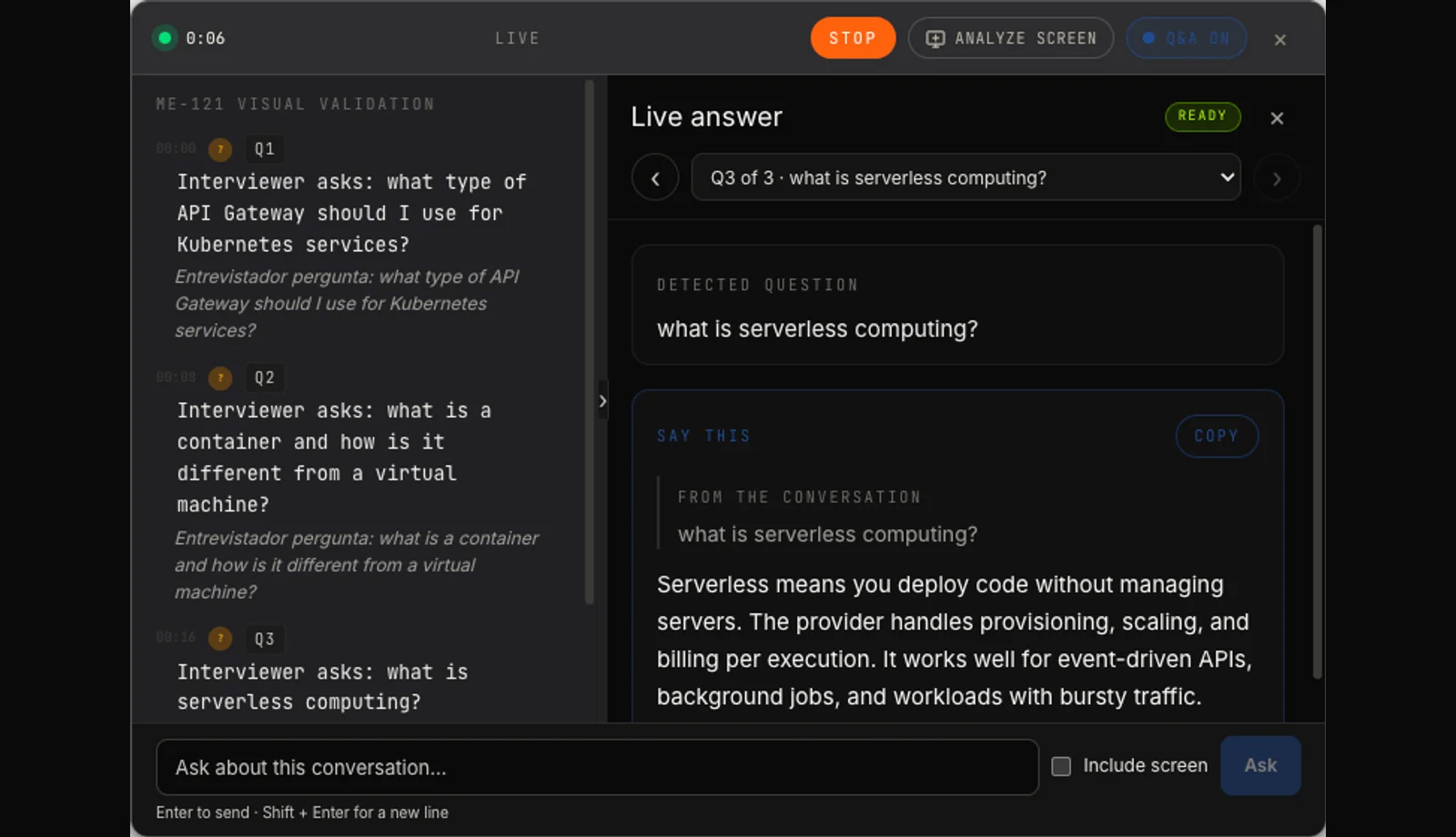
Real app · two-column listening
Transcript and answer stay readable side by side.
In this synthetic technical interview, Minuta keeps the live conversation on the left and the suggested answer on the right, with Portuguese translation available in the transcript.
Ask AI
Your question. The conversation’s context.
Type a question while recording in any of the four modes. Minuta combines the conversation, mode and documents; if you allow it, Minuta can also analyze what is visible on screen at that moment.
Software engineering
“What could we improve in this approach?”
Legal
“Which points still need clarification?”
Available in General, Technical interview, Software engineering meeting and Legal hearing modes on Pro and in the 7-day trial, within its minute allowance. Screen analysis is optional and only runs when you turn it on.
Real app with synthetic demonstration data · Click to enlarge
New in Minuta
From preparation to history. More control at every step.
Choose how your copilot should work, bring your context into the conversation and find every decision later with the right source.
Meeting modes
Four modes for four kinds of conversation
Each mode adjusts how the copilot behaves. You can also save named configurations with your own instructions and documents to reuse in future meetings.
01
General
For everyday conversations, syncs, discovery calls and customer meetings.
02
Technical interview
Detects questions and prepares suggestions automatically during the interview.
03
Software engineering meeting
Offers stricter detection and answers about passages you select.
04
Legal hearing
Uses case documents as grounding while helping during the hearing.
Ask AI in any mode
On Pro and in the 7-day trial, ask a question in your own words in any mode. Minuta combines the conversation, selected mode and attached documents. If you turn on screen analysis, it also includes what is visible at that moment — always as an opt-in choice and within the minute allowance.
Prepare once. Reuse when you need it.
Save configurations with a mode, your instructions and documents you use often. For the next conversation, select the saved setup and start with the same context.
Real app · Calendar with demonstration data
Google Calendar integration
Your next meeting starts with your calendar
See upcoming events from your primary Google calendar inside Minuta. Choose Prepare meeting to fill in the event title while keeping your selected mode, configuration and documents. You decide when to start listening.
Limited availability while the integration goes through Google verification.
Real app · Synthetic demonstration data
After the meeting
A summary and notes you can keep shaping
Edit the summary and write your own notes in the same record. Minuta saves changes automatically, so you can continue the work without copying content between tools.
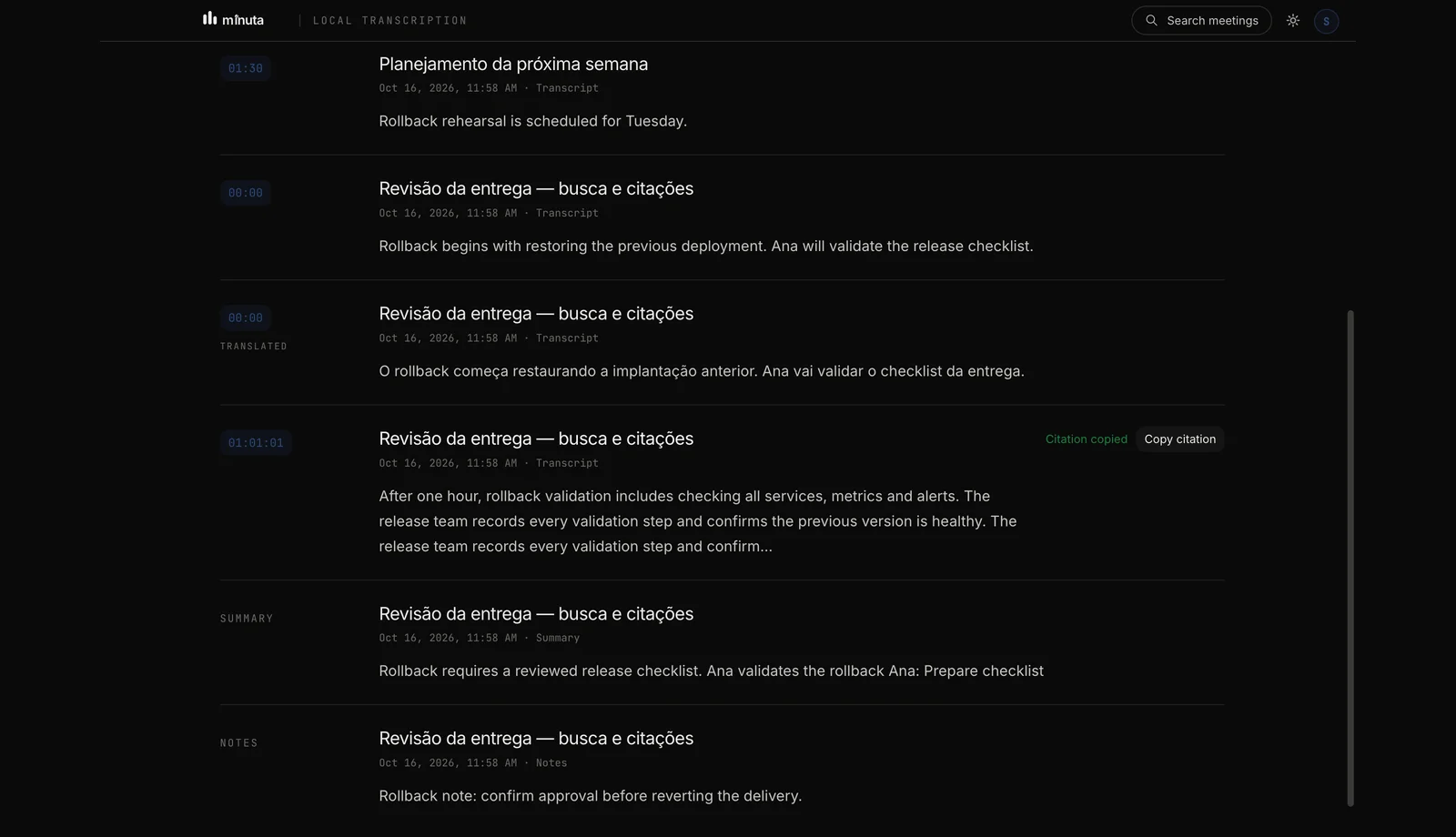
Local meeting history search · Click to enlarge
Searchable history
Find the conversation and return to the exact moment
Search titles, transcripts, summaries and notes. Title, summary and note results open the matching record; transcript results return to the exact moment and let you copy a timestamp citation.
Optional protection · Check the preview before sharing
Screen-sharing protection
Screen-sharing protection
Optional protection is enabled by default on macOS and Windows and attempts to exclude the Minuta window from screen capture. On macOS, some ScreenCaptureKit flows may bypass it; on Windows, results depend on the capture method. It is unavailable on Linux. Check the preview before sharing.
Hello.Olá.Hola.
EN↔PT↔ES
Beyond the language barrier
Understand the question. Find your words.
Follow the transcript and translation as your meeting happens. When you need a hand, get a suggested answer in the language of the conversation.
Try every feature for 7 days, with 120 minutes total for the entire trial. After that, Free includes 60 shared minutes/month of transcription and translation; copilot responses require Pro. Pro keeps every feature unlimited.
Free
060 min / month
120 minutes total over the 7-day trial. Then 60 shared minutes/month.
7 days with every feature unlocked, up to 120 minutes total
60 shared minutes/month for transcription and translation after the trial
Copilot responses disabled on Free after day 7
No meeting bot joins Zoom, Teams, or Google Meet
Local transcript storage plus Markdown / Obsidian export
Automatic speaker identification on every recording
Personal context: load PDFs, notes, and documents
Real-time web search to enrich answers
Priority support
First 100 customers get US$ 6.99/month for 12 months, billed in USD.
Monthly and annual plans are charged in your selected currency: USD, EUR or BRL. Founding 100 is always charged in USD. Cancel anytime.
FAQ
Frequently asked questions.
Yes. Connect your primary Google calendar with read-only access to see upcoming events and prepare a meeting while keeping your selected mode, configuration and documents. Listening starts only when you choose to start it. Limited availability while the integration goes through Google verification.
Make your next conversation different
Fewer notes. More presence.
Make room to listen, think and respond. Let Minuta follow the details.
Try it free7 days to explore · No credit card required