AI meeting copilot: real-time answers in English, Portuguese and Spanish
How an AI meeting copilot suggests answers during live calls in English, Portuguese and Spanish: question detection, answer language, context documents, examples and honest limits.
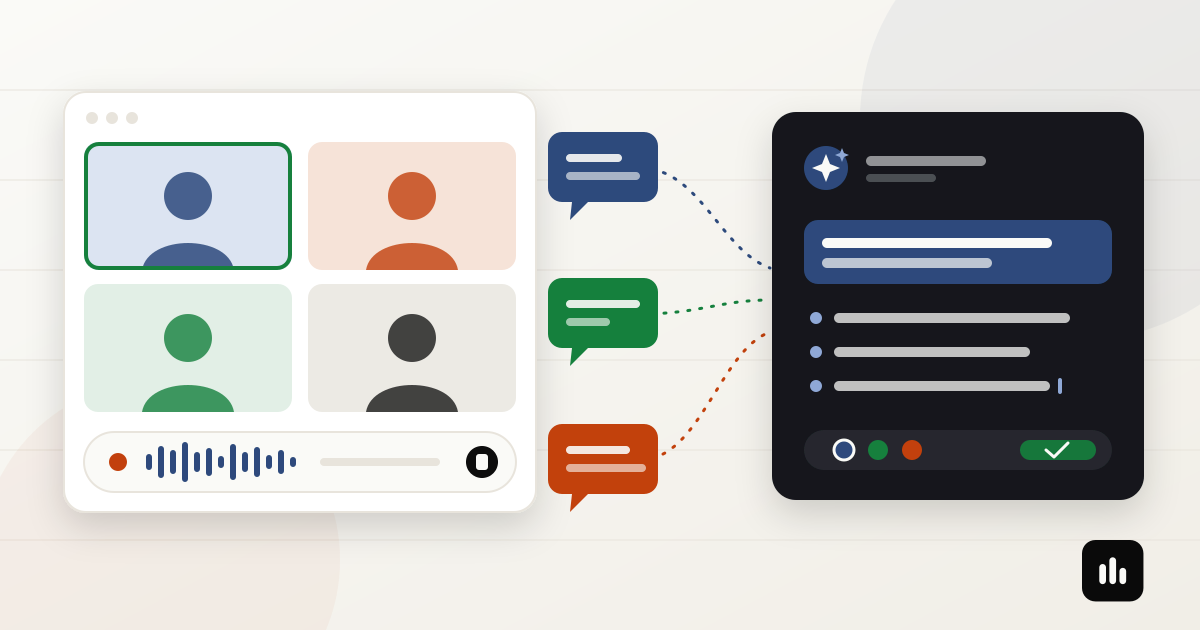
Someone on the call asks the question that matters — pricing, architecture, scope, a deadline — and everyone looks at you. You know the answer. What you need in the next few seconds is a clear version of it, in the language the conversation is happening in.
That is the job of an AI meeting copilot: help you answer during the meeting, not summarize it afterwards. And for many professionals the conversation is not only in English. A Brazilian engineer may talk to a US customer in the morning, a partner in Mexico after lunch and their own team in Portuguese at the end of the day.
This guide explains how real-time answers work in practice, how to choose the answer language when a meeting happens in English, Portuguese or Spanish, and where the limits are.
What an AI meeting copilot does during the call
A notetaker records the meeting and gives you a transcript and a summary when it is over. That is useful, but it arrives late. A copilot works while people are still talking:
- It follows a live transcript of the conversation.
- It notices — or you tell it — that a question needs an answer.
- It drafts a short answer using the transcript so far and the documents you prepared.
- You read it, adapt it and say it in your own words.
If you are still deciding between the two categories, read AI meeting copilots vs AI notetakers.
Four ways to get an answer in the middle of a meeting
In Minuta, the copilot answers in four situations. All of them land in the same answer panel next to the live transcript:
- Automatic question detection. The copilot watches the transcript for questions directed at you and prepares an answer without a click. You can turn automatic answers off when you only want help on demand.
- Your own question. Type what you need — "how do I explain the migration risk in two sentences?" — and get a draft grounded in the call so far.
- Answer a highlighted passage. Select a sentence in the transcript and ask for an answer to exactly that point. Useful when the question was long or mixed with other topics.
- Analyze what is on screen. When someone shares a slide, a dashboard or a piece of code, capture the screen and ask the copilot to explain it or prepare a response.
A global keyboard shortcut triggers the copilot without leaving Zoom, Teams or Meet, so you don't have to switch windows while someone is waiting for you.
Meeting language vs answer language
This is where multilingual meetings get interesting. Two settings work together:
- Meeting language: what people are speaking — English, Portuguese, Spanish, or automatic detection when the call mixes languages.
- Answer language: the language of the copilot's drafts — automatic (follows the meeting language) or always English, Portuguese or Spanish.
Common combinations:
- Meeting in English, answer in English. You are about to say the answer out loud to an international customer or manager.
- Meeting in English, answer in Portuguese or Spanish. Internal calls where you only need to understand the reasoning quickly and then answer in your own words.
- Meeting in Spanish, answer in Spanish. Calls with partners and customers in Latin America or Spain.
- Meeting in Portuguese, answer in Portuguese. Team meetings, client calls in Brazil or Portugal, technical reviews.
- Mixed-language call, automatic answer language. The draft follows the language of the meeting.
The rule of thumb: answer in the language you are about to speak. A draft in your first language helps you think; a draft in the meeting language helps you talk. If you also need to understand fast English speech, combine the copilot with live meeting translation.
Give the copilot context before the call
A copilot is only as good as what it knows. Generic answers come from generic context. Before an important meeting:
- Create a saved configuration for recurring meetings — sales calls, sprint reviews, customer onboarding — with the documents the copilot should use: one-pagers, pricing notes, architecture decisions, FAQs.
- Pick the meeting type. General meetings, engineering meetings (with optional stricter question detection) and legal meetings, which require case documents and keep general legal knowledge separate from what the documents say.
- Add a few lines of instructions. Your role, the goal of the call, what you can promise and what you can't.
The copilot then combines three things: the live transcript, your documents and your instructions. That is what makes a draft sound like your answer instead of a generic paragraph.
What it looks like (illustrative examples)
The examples below were written for this article to show the format. They are not recordings of real meetings.
Meeting in English, answer in English
Customer: "Can we keep our data in the EU if we sign this quarter?"
Copilot draft: Yes — confirm the hosting region in the contract before signing.
• Data stays in the region chosen at setup.
• Moving between regions needs a planned window.
• Next step: send the data-processing addendum today.
Reunião em português, resposta em português
Cliente: "Quanto tempo leva para integrar com o nosso ERP?"
Rascunho do copiloto: Entre duas e quatro semanas, dependendo do acesso à API do ERP.
• Primeira semana: credenciais e mapeamento de campos.
• Depois: testes com dados reais.
• Risco principal: aprovação do time de segurança.
Reunión en español, respuesta en español
Socio: "¿Qué pasa si el volumen se duplica en diciembre?"
Borrador del copiloto: El plan actual absorbe el doble de volumen sin cambios de arquitectura.
• Revisaremos los límites de la API en noviembre.
• Si superamos el triple, conviene escalar la base de datos.
Notice the shape: a direct one- or two-sentence recommendation followed by short bullets with the details. That format is easy to glance at while someone is still talking.
How to use a draft without sounding like a robot
- Read the first line, then look up. The recommendation is usually enough to start talking; the bullets are there if you need detail.
- Say it in your words. The draft supports your thinking, not your voice. Paraphrasing also keeps the tone natural.
- Check numbers, names and promises. Prices, dates and commitments should come from your documents — verify them before you say them.
- Buy two seconds when you need them. "Good question — let me make sure I answer the right part" is perfectly natural in any language.
For a framework on structuring answers under pressure, see how to answer technical questions in English meetings.
Limits you should know about
- It suggests; you decide. Drafts can be incomplete or wrong, especially with poor audio, overlapping speakers or missing documents.
- There is a short delay. The question has to be transcribed before the copilot can answer, and connection quality affects speed.
- It needs an internet connection. Transcription and AI answers use cloud services; meeting records are saved in the desktop app. See how Minuta handles meeting data.
- Follow the rules of the meeting. Minuta does not join as a participant, but you should still respect your company's and the other party's policies on transcription and AI assistance.
- Answers are a Pro feature. The 7-day trial includes everything; after that, copilot answers require Pro.
Checklist before your next important meeting
- Meeting language set (English, Portuguese, Spanish or automatic)
- Answer language chosen — usually the language you will speak
- Saved configuration with the right documents loaded
- Automatic answers on or off, depending on how much help you want
- Keyboard shortcut tested once before the call
- Numbers and commitments double-checked in your own documents
Frequently asked questions
Does the AI copilot work in Portuguese and Spanish, not only English?
Yes. The meeting can be in English, Portuguese or Spanish (or detected automatically), and the copilot can answer in the meeting language or always in the language you choose.
Can the meeting be in English and the answer in Portuguese?
Yes. Set the answer language to Portuguese. It helps you understand the point quickly in internal calls; when you need to speak to the customer, an English draft is usually better.
Will the other participants see the copilot?
No bot joins the meeting. Minuta captures your computer's audio, and the answers appear only in the app on your screen.
Which meeting platforms does it work with?
Zoom, Microsoft Teams, Google Meet and other desktop meeting apps, because it works from system audio. It runs on macOS, Windows and Linux.
How much does it cost?
The 7-day trial includes every feature with 120 minutes total, no card required. Copilot answers then require Pro; the first 100 Pro customers (Founding 100) lock in US$ 6.99/month for 12 months. See current plans.
Summary
An AI meeting copilot is useful at one specific moment: when a question needs an answer now. Set the meeting language, choose the answer language you are going to speak, load the documents that make answers specific, and treat each draft as a starting point you say in your own words — in English, Portuguese or Spanish.
See how the AI meeting copilot works, or download Minuta and set it up before your next call.